Date Difference Calculator
How many days are left until your exam, your visa date, or your wedding? How old is a baby in months? How long has an employee worked in a company? All these questions need one simple thing: the gap between two dates.
You can count on a calendar, but it is slow and easy to get wrong. A date difference calculator does the job in one second. You pick a start date and an end date, and the tool shows the answer in years, months, days, weeks and even hours.
In this guide, you will learn how the calculation works, how to do it by hand, how to do it in Excel and Google Sheets, and how to avoid the mistakes that most people make. Every example here was worked out step by step, so you can follow along and check the numbers yourself.
Many people use a percentage calculator to quickly calculate percentages, find percentage increases or decreases, and compare values. It makes everyday math easier for students, professionals, and anyone working with numbers. Simply enter the required values to get an accurate percentage result.
Date Difference Calculator
Calculate the exact difference between two dates in years, months, days, and total days.
Calendar months have 28 to 31 days and years have 365 or 366 days, so the years, months and days breakdown is counted on the real calendar, not as 30-day months.
What Is a Date Difference Calculator?
A date difference calculator is a tool that finds the time between two calendar dates. It tells you the total number of days, and it can also break the result into years, months, weeks and days.
For example, the gap between 1 January 2026 and 31 December 2026 is 364 days. If you count both the first and the last day, the answer is 365 days. This small choice between counting and not counting the last day is the biggest reason people get different answers, and we will explain it fully below.
How a Date Difference Calculator Works
Dates are part of almost every task in daily life. Here are some common reasons people search for this tool.
Students count the days left before board exams, university tests or admission deadlines. Office workers count how long a project took, or how many days an invoice is overdue. Parents check a baby age in months for vaccine schedules. Travelers check how many days they stayed abroad, because many countries set limits on how long a visitor can stay. Human resource teams measure service length for leave, bonus and gratuity rules.
People in India, the United States and Pakistan use these calculations for many local needs too. Examples include notice periods for jobs, loan and installment periods, school age cut off dates, passport and visa validity, and pregnancy or medical follow-up timelines.
When a mistake of even one day can mean a missed deadline or a wrong payment, a trusted tool is very helpful.
How a Date Difference Calculator Works
Behind the screen, the tool follows a very simple idea. It turns each date into a single number, called a day count. Then it subtracts the smaller number from the larger one.
Think of it like marks on a ruler. Every day has its own mark. To find the length between two marks, you subtract one from the other. The tool does the same, but it also knows how many days each month has and which years have an extra day in February.
After it finds the total days, it can show the answer in other forms. Seven days make one week. To show years, months and days, the tool moves forward from the start date one full year at a time, then one full month at a time, and whatever is left becomes the days.
Step by Step: How to Use an Online Date Difference Calculator
Using any online date difference calculator is easy. The steps are almost the same on every website.
First, enter the start date. This is the earlier date, such as a birth date or a project start date. Second, enter the end date. This is the later date, such as today or a deadline. Third, choose if you want to include the last day in the count. Fourth, press the calculate button. Finally, read the result in total days, and in years, months and days.
If your tool also allows time, you can enter hours and minutes too. This is useful for shifts, flights and short tasks where the hour matters.
A good habit is to check the date format before you press the button. Many mistakes happen only because of format, and we will cover that in the common mistakes section.
Worked Examples With Real Numbers
Examples make the idea clear. Here are five simple cases. Each one was counted by hand using the real calendar.
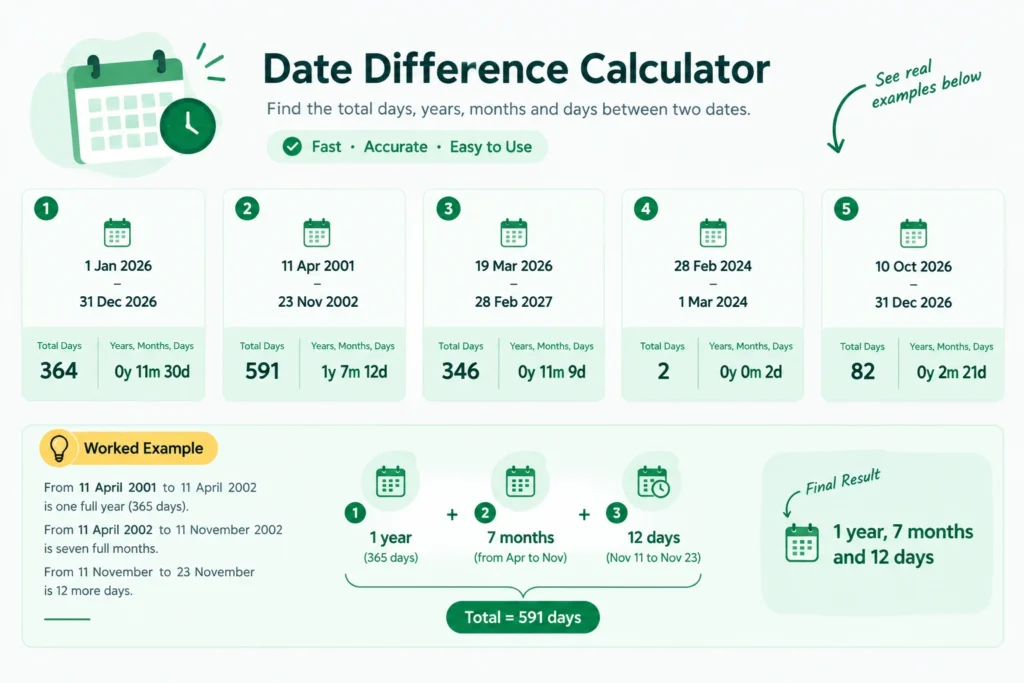
| Start Date | End Date | Total Days | Years, Months, Days |
|---|---|---|---|
| 1 January 2026 | 31 December 2026 | 364 | 0 years, 11 months, 30 days |
| 11 April 2001 | 23 November 2002 | 591 | 1 year, 7 months, 12 days |
| 19 March 2026 | 28 February 2027 | 346 | 0 years, 11 months, 9 days |
| 28 February 2024 | 1 March 2024 | 2 | 0 years, 0 months, 2 days |
| 10 October 2026 | 31 December 2026 | 82 | 0 years, 2 months, 21 days |
Let us walk through the second row, because it shows how the method works. From 11 April 2001 to 11 April 2002 is one full year, which is 365 days. From 11 April 2002 to 11 November 2002 is seven full months. From 11 November to 23 November is 12 more days. So the answer is 1 year, 7 months, and 12 days. If you add the days up, the total is 591.
Now look at the fourth row. The year 2024 is a leap year, so February has 29 days. From 28 February to 1 March is 2 days, not 1. In a normal year, the same dates would be only 1 day apart. A good calculator handles this on its own.
Include the Last Day or Not?
This is the question that creates the most confusion, so it deserves its own section.
Suppose you start a course on Monday and it ends on Friday. If you subtract Monday from Friday, you get 4 days. But if you count Monday, Tuesday, Wednesday, Thursday and Friday as five days of classes, you get 5 days.
Both answers are right. They answer two different questions. The first answer measures the gap between two dates. The second answer counts how many calendar days are touched by the period.
Use the plain difference when you want to know how much time passed. Use the inclusive count when both the first and the last day are part of the period, such as a hotel stay where you count both nights and days, a leave application, or a fasting or training schedule.
When you read your result, always check which mode the tool used. Good tools show a simple switch for this.
Leap Years and Why They Matter
A normal year has 365 days. A leap year has 366 because February gets an extra day, the 29th. The rule is simple. A year is a leap year if it can be divided by 4. But if it can be divided by 100, it is not a leap year, unless it can also be divided by 400.
So 2024 is a leap year. The year 1900 was not a leap year. The year 2000 was a leap year. The next leap year after 2024 is 2028.
This rule is part of the Gregorian calendar, the calendar used for civil life in the United States, India and Pakistan. Over a full cycle of 400 years, the Gregorian calendar has 146,097 days, which makes the average year about 365.2425 days long. That is why the rule is built the way it is. It keeps the calendar close to the real path of the Earth around the Sun.
If you calculate by hand across several years, you must count the leap days. Missing even one gives a wrong answer. This is one of the best reasons to use a date difference calculator instead of mental math.
How to Calculate Date Difference by Hand
You do not always have a tool nearby, so here is a simple method you can use on paper.
Start with the years. Subtract the start year from the end year. Then check if the end date has reached the same month and day as the start date. If it has not, take away one year, because the last year is not complete.
Next, count the months. Move forward from the start date by whole months until you cannot move any more without passing the end date.
Last, count the leftover days. These are the days between your last month stop and the end date.
Let us test it with a birthday case. A person was born on 15 May 2000. Today is 10 October 2026. From 15 May 2000 to 15 May 2026 is 26 full years. From 15 May 2026 to 15 September 2026 is 4 full months. From 15 September to 10 October is 25 days. So the age is 26 years, 4 months, and 25 days.
Birth Date Difference Calculator: Finding Exact Age
One of the most popular uses is age. A birth date difference calculator, also called a birthday date difference calculator, takes your birth date as the start and today as the end.
Many forms in schools, banks, job portals and government offices ask for age on a certain date, not just your current age. For example, a school may say a child must be 5 years old on 31 March to join class one. A job post may say the age limit is 30 years on the closing date. In these cases, you set the end date to that cut off date and not to today.
Parents also use the months and days result for babies. Doctors often track growth in months, so a result like 7 months and 12 days is more useful than just 0 years.
You can also find how many days remain until your next birthday. Set the start date as today and the end date as your next birthday. The answer is a small number that is fun to share.
Date Difference Calculator With Time
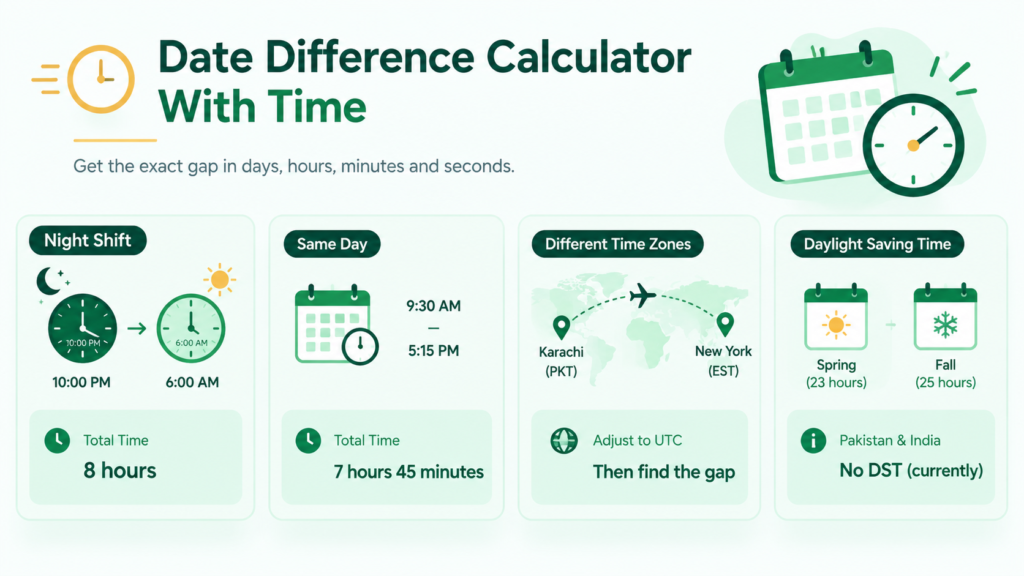
Sometimes the day is not enough. Think about a night shift that starts at 10 PM and ends at 6 AM. The dates may be different, but the real work time is only 8 hours.
A time and date difference calculator takes both the date and the clock time for each side. It finds the full gap in days, hours, minutes, and seconds.
A simple example: a task starts at 9:30 AM and ends at 5:15 PM on the same day. The gap is 7 hours and 45 minutes.
Time zones add one more layer. If a flight leaves Karachi and lands in New York, the clock times belong to two different zones. For a correct result, you should first change both times to one common zone, such as UTC, and then find the gap. Daylight saving time in the United States also moves clocks by one hour in spring and fall, which can make a day have 23 or 25 hours. Pakistan and India do not use daylight saving time at present, which makes local calculations simpler.
Hijri Date Difference Calculator
Many readers in Pakistan, India and the wider Muslim world also use the Hijri calendar for religious events such as Ramadan, Eid and Hajj.
The Hijri calendar follows the Moon. It has 12 months, and each month has 29 or 30 days, depending on when the new moon is seen. A Hijri year has about 354 or 355 days, which is around 11 days shorter than a Gregorian year. Because of this, Islamic events move earlier in the Gregorian calendar each year.
A Hijri date difference calculator works with these lunar months. Remember that the exact start of a month can change by one day based on moon sightings in each country. So for a religious date, use the result as a guide and confirm the final date with your local moon sighting authority.
How to Use Excel as a Date Difference Calculator
Excel makes date differences very easy, especially when you work with many dates at once. Excel saves each date as a serial number, which is the count of days from a fixed starting point. That is why simple subtraction works so smoothly.
Basic method: subtract the dates
If the start date is in cell A2 and the end date is in B2, type this in C2:
=B2-A2
Excel will show the number of days. If it shows a date instead of a number, change the cell format to General or Number.
Years, months, and days with DATEDIF
For years, months and days, use the DATEDIF function. It is a hidden function in Excel, so it may not appear in the suggestion list, but it works. Write the unit in quotes:
=DATEDIF(A2,B2,"d")gives total days.=DATEDIF(A2,B2,"m")gives complete months.=DATEDIF(A2,B2,"y")gives complete years.
To get a full sentence like “1 years, 7 months, 12 days”, join three parts:
=DATEDIF(A2,B2,"y")&" years, "&DATEDIF(A2,B2,"ym")&" months, "&DATEDIF(A2,B2,"md")&" days"
The unit “ym” gives the months left after full years, and “md” gives the days left after full months. Note that Microsoft warns the “md” unit can sometimes give incorrect results, so double-check important calculations.
Working days only
To count only working days and skip weekends, use NETWORKDAYS:
=NETWORKDAYS(A2,B2)
This counts both the start and end date. You can add a list of holidays as a third argument so public holidays are skipped too:
=NETWORKDAYS(A2,B2,E2:E10)
This is very useful for businesses, since public holidays differ from country to country. If your weekend is not Saturday and Sunday, use NETWORKDAYS.INTL instead, which lets you choose the weekend days.
One tip: Always keep the earlier date first. If the end date is earlier than the start date, DATEDIF returns a #NUM! error.
Date Difference in Google Sheets
Google Sheets works almost the same as Excel. Subtraction with =B2-A2 gives total days. The DATEDIF function also works there with the same units.
Google Sheets has one more helper called DAYS. The formula =DAYS(B2,A2) takes the end date first and then the start date. Be careful with that order, because it is the reverse of what many people expect.
Sheets also lets you share the file with your team, so everyone sees the same numbers. That is helpful for project schedules and attendance logs.
Date Difference in SQL, JavaScript and Python
Developers often need to find the gap between dates inside software. Each language has its own way.
In SQL Server, the function looks like this:
SELECT DATEDIFF(day, ‘2026-03-19’, ‘2027-02-28’);
This returns 346. In MySQL, the function takes the end date first, so you write DATEDIFF(‘2027-02-28′,’2026-03-19’). In PostgreSQL, you can subtract dates directly with end_date – start_date.
In JavaScript, you subtract two. Date objects and divide the answer by the number of milliseconds in one day:
(end – start) / (1000 * 60 * 60 * 24)
In Python, it is even easier. If d1 and d2 are date objects, then (d2 – d1).days gives the total days.
A small warning for developers: daylight saving changes and time zones can add or remove an hour. When you only need whole days, work with plain dates and not date and time values.
Business Days vs Calendar Days
Calendar days count every day. Business days count only working days, which are usually Monday to Friday in the United States. In Pakistan, many offices work Monday to Friday, while some work six days. In India, the working pattern also differs by company and sector.
A loan notice period, a courier delivery promise or a bank transfer window may use business days. Contracts often say which type applies. If a contract says 30 days, check if it means 30 calendar days or 30 working days, because the real gap can differ by almost two weeks.
When you use a tool, choose the mode that matches your paper or contract.
Real Life Uses by Country
In the United States, people use a date difference calculator for visa stay limits, tax filing timelines, lease and rent periods, and immigration paperwork. Many agencies measure deadlines in calendar days, so counting correctly is important.
In India, it is common to calculate notice periods for jobs, age for government exam eligibility, and loan or insurance policy terms. Age on a fixed cut off date is a very common use.
In Pakistan, readers often use it for age on admission and job form dates, visa and passport validity, iddat or Hijri date planning, and fee or installment schedules.
In all three countries, students and parents also use it as an exam countdown.
Common Mistakes to Avoid
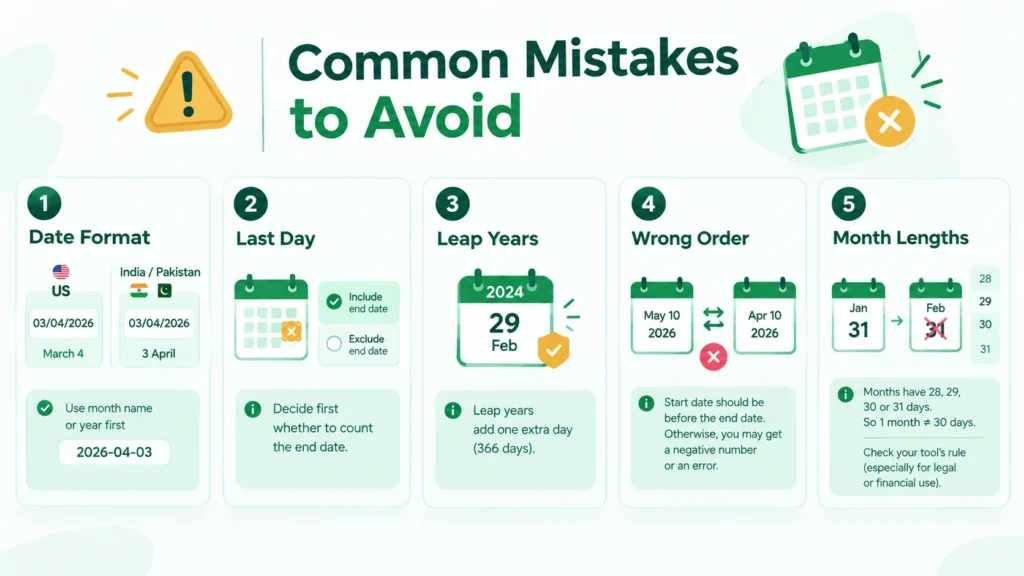
The first mistake is the date format. In the United States, 03/04/2026 means March 4. In India and Pakistan, the same text usually means 3 April. If you enter dates in the wrong order, the answer will be completely off. Whenever possible, choose the month by name or use the year first format, such as 2026-04-03.
The second mistake is forgetting the last day. As explained earlier, decide before you start whether you count the end date.
The third mistake is ignoring leap years. A hand count over many years can miss one day easily.
The fourth mistake is putting the dates in the wrong order. If the start date is later than the end date, some tools show a negative number and some show an error.
The fifth mistake is mixing months of different lengths. One month is not always 30 days. It can be 28, 29, 30 or 31 days. So 30 days and 1 month are not always the same thing. Say Jan 31 plus one month: there is no 31 February, so tools handle this in slightly different ways. Check the rule your tool follows if the result matters for a legal or money matter.
How to Check Your Result
Trust is important, especially when the answer affects money, travel or paperwork. Here is a simple way to double check.
Run the dates through two different methods, such as an online tool and an Excel formula. If both show the same total days, you can be confident. Next, test a small known case. For example, 28 February to 1 March in a normal year must be 1 day, and in a leap year must be 2 days. If a tool fails this test, do not use it.
For official matters such as court deadlines, immigration filings or legal contracts, also read the rules written by the authority. A calculator gives the math, but the official rule decides how the days are counted.
Why Use an Online Date Difference Calculator?
You could use paper, a calendar app or a spreadsheet, so why use an online tool? The first reason is speed. You get the answer in one second. The second reason is accuracy, because a good tool already knows leap years, month lengths and the rules for counting. The third reason is clear output. You get days, weeks, months and years in one place, with no formula to remember. The fourth reason is that it works on any phone or laptop without installing anything.
Spreadsheets are still better when you have hundreds of rows, such as a list of employees or invoices. For a single check, an online tool is the fastest way.
Explore More Calculators
GetCalculatorHub provides simple and easy-to-use online calculators for everyday needs.
Our goal is to make calculations quick, clear, and accessible for everyone.
For questions or suggestions, please visit our Contact Us page or learn more on our About Us page.
Please also review our Terms and Conditions and privacy policy to understand how our website works.
Frequently Asked Questions
Subtract the earlier date from the later date. For example, from 10 October 2026 to 31 December 2026 is 82 days. A date difference calculator does this instantly and also handles leap years.
Count full years first, then full months, and finally the remaining days. For example, from 11 April 2001 to 23 November 2002, the difference is 1 year, 7 months and 12 days.
By default, most date difference calculators measure the time between dates without counting the end date as an additional day. If you want to count both the start and end dates, add one day or use an include end date option if available.
Use =B2-A2 to calculate the number of days between two dates in Excel. You can also use =DATEDIF(A2,B2,"y") for complete years, =DATEDIF(A2,B2,"m") for complete months, and =DATEDIF(A2,B2,"d") for total days.
A leap year has 366 days instead of the usual 365. February has 29 days during a leap year, which can affect date difference calculations.
Yes, if you use a date and time difference calculator that supports hours and minutes. Enter both dates and their times to calculate the elapsed time in days, hours and minutes.
Yes. The United States commonly uses month/day/year, while India and Pakistan commonly use day/month/year. Check the date format carefully before calculating to avoid incorrect results.
Yes. Enter your date of birth as the start date and today's date as the end date. The calculator can show your age in years, months and days, provided it supports this format.
Use the NETWORKDAYS function in Excel or Google Sheets to count working days between two dates. It can exclude weekends and, when configured, public holidays. You can also use a business-day calculator that supports these options.
One tool may count the end date while another measures only the gap between dates. Differences can also result from calendar-month rules, date formats, or time-zone settings.
Yes. Enter any two valid dates in the past, making sure the start date is earlier than or equal to the end date. The calculator will show the time between them.
Yes. Enter today's date as the start date and your target date as the end date. You can find out how many days remain until a birthday, holiday, event, exam or deadline.
First, calculate the total number of days between the two dates. Divide that number by 7 to get the number of weeks. For example, 28 days equals exactly 4 weeks.
Many online date difference calculators are free to use. You can enter two dates and calculate the time between them without doing the maths manually. Check the individual tool for any limitations.