How to Calculate Percentage Increase and Decrease (With Examples)
Have you ever wanted to know how much a price has increased or decreased? For example, a product costs $50, but its new price is $60. How can you calculate the percentage increase? Similarly, if a product’s price drops from $80 to $60, how do you find the percentage decrease?
The good news is that calculating percentage increase and decrease is simple when you know the correct formulas.
In this guide, you will learn how to calculate percentage increase and decrease, understand the formulas, and solve real-life examples involving prices, salaries, marks, and discounts. You can also use an online percentage calculator to check your answers quickly.
What Is Percentage Increase and Decrease?
Percentage increase and decrease show how much a value changes compared with its original value. They help you understand changes in prices, income, expenses, marks, and many other things.
What Is Percentage Increase?
Percentage increase means a value has become larger than it was before.
For example, suppose a notebook costs $10, but its price increases to $12. The price has increased by $2.
To find the percentage increase, compare the difference with the original price.
What Is Percentage Decrease?
Percentage decrease means a value has become smaller than it was before.
For example, a bag originally costs $100, but its price drops to $80. The price has decreased by $20.
You can calculate the percentage decrease by dividing the difference by the original price and multiplying the result by 100.
How to Calculate Percentage Increase
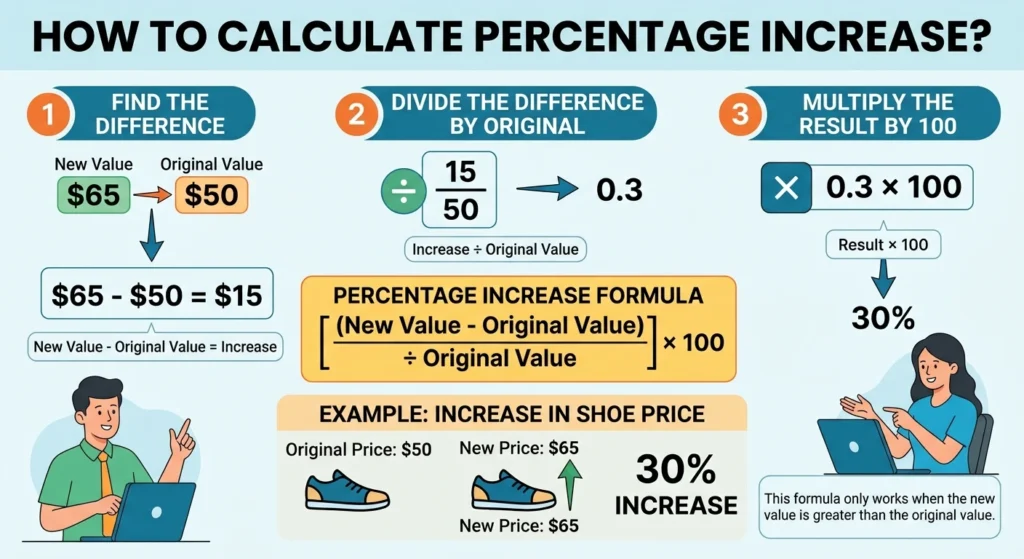
You can calculate percentage increase by following three simple steps.
- Find the difference between the new value and the original value.
- Divide the difference by the original value.
- Multiply the result by 100.
Percentage Increase Formula
Percentage Increase = [(New Value − Original Value) ÷ Original Value] × 100
This formula works when the new value is greater than the original value.
Example 1: Price Increase
Suppose a pair of shoes originally costs $50. The price increases to $65. What is the percentage increase?
Step 1: Find the difference.
Difference = $65 − $50 = $15
Step 2: Divide by the original price.
$15 ÷ $50 = 0.30
Step 3: Multiply by 100.
0.30 × 100 = 30%
Answer: The price of the shoes has increased by 30%.
Example 2: Salary Increase
Suppose your monthly salary increases from $2,000 to $2,300.
Original salary = $2,000
New salary = $2,300
Increase = $2,300 − $2,000 = $300
Percentage increase = ($300 ÷ $2,000) × 100
Percentage increase = 15%
Answer: Your salary has increased by 15%.
This calculation helps employees understand salary changes and compare increases over time.
How to Calculate Percentage Decrease
Percentage decrease uses a similar method, but you subtract the new value from the original value.
Percentage Decrease Formula
Percentage Decrease = [(Original Value − New Value) ÷ Original Value] × 100
Use this formula when the new value is smaller than the original value.
Example 1: Product Discount
Suppose a jacket originally costs $120. A store reduces its price to $90. What is the percentage decrease?
Step 1: Find the difference.
Difference = $120 − $90 = $30
Step 2: Divide by the original price.
$30 ÷ $120 = 0.25
Step 3: Multiply by 100.
0.25 × 100 = 25%
Answer: The jacket’s price has decreased by 25%.
Example 2: Monthly Expenses
Imagine your monthly expenses decrease from $800 to $680.
Original expenses = $800
New expenses = $680
Decrease = $800 − $680 = $120
Percentage decrease = ($120 ÷ $800) × 100
Percentage decrease = 15%
Answer: Your monthly expenses have decreased by 15%.
This method can help you compare expenses and understand how much they have changed.
How to Calculate Percentage Change Between Two Numbers
Sometimes, you may not know whether a change should be described as an increase or a decrease until you compare the two values.
In this situation, you can use the percentage change formula.
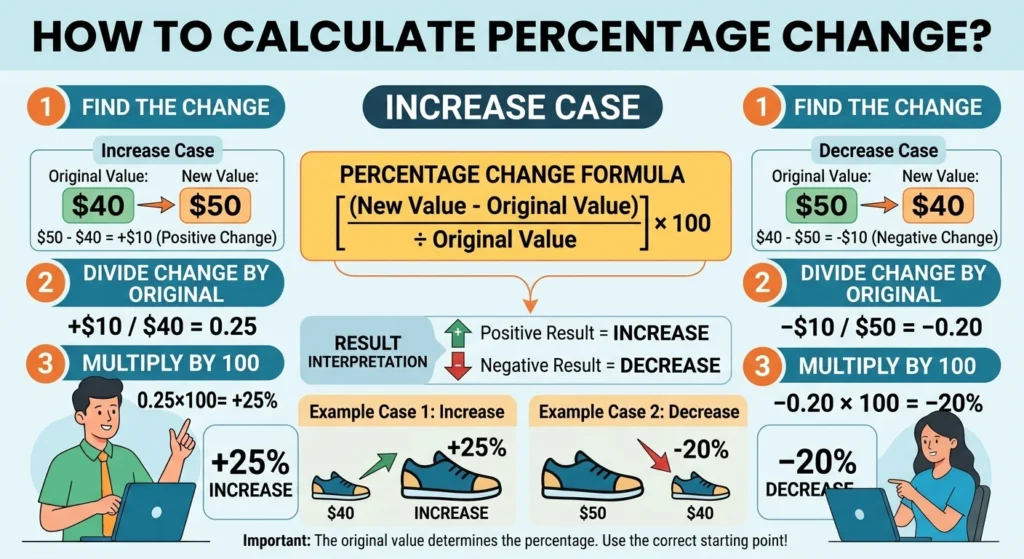
Percentage Change = [(New Value − Original Value) ÷ Original Value] × 100
The result tells you the direction of the change:
- A positive result means the value increased.
- A negative result means the value decreased.
- A result of zero means the value did not change.
Example
Suppose a product’s price changes from $40 to $50.
Percentage change = [($50 − $40) ÷ $40] × 100
Percentage change = ($10 ÷ $40) × 100
Percentage change = 25%
The result is positive, so the price increased by 25%.
Now suppose the price changes from $50 to $40.
Percentage change = [($40 − $50) ÷ $50] × 100
Percentage change = (−$10 ÷ $50) × 100
Percentage change = −20%
The negative result means the price decreased by 20%.
Notice that the increase and decrease percentages are different because they use different original values.
Percentage Increase and Decrease Examples in Daily Life
Percentage calculations are useful in many everyday situations. Here are some common examples.
1. Calculating a Discount
Suppose a laptop costs $1,000, and the store offers a 10% discount.
Discount amount = ($1,000 × 10) ÷ 100
Discount amount = $100
Final price = $1,000 − $100
Final price: $900
You save $100 on the original price.
2. Calculating an Increase in Exam Marks
Suppose a student receives 60 marks in one test and 75 marks in another. To calculate the percentage increase in marks:
Increase = 75 − 60 = 15
Percentage increase = (15 ÷ 60) × 100
Percentage increase: 25%
The student’s marks increased by 25% compared with the first test.
This is different from calculating the student’s percentage score out of the total possible marks.
3. Calculating a Rise in Rent
Suppose your monthly rent increases from $1,200 to $1,320.
Increase = $1,320 − $1,200 = $120
Percentage increase = ($120 ÷ $1,200) × 100
Percentage increase: 10%
Your monthly rent has increased by 10%.
4. Calculating a Decrease in Website Visitors
Imagine a website receives 5,000 visitors in one month and 4,000 visitors the next month.
Decrease = 5,000 − 4,000 = 1,000
Percentage decrease = (1,000 ÷ 5,000) × 100
Percentage decrease: 20%
The website’s visitor count decreased by 20%.
This method can help website owners compare traffic between different periods.
How to Calculate Percentage Increase or Decrease Quickly
If you do not want to calculate everything manually, you can use an online Percentage Calculator.
Follow these steps:
- Open a reliable online Percentage Calculator.
- Enter the original value.
- Enter the new value.
- Select the percentage change calculation, if the calculator provides that option.
- Calculate the result and check whether the value increased or decreased.
You can use the Percentage Calculator to find the relevant calculator on the website. Add a direct link to your actual Percentage Calculator page here so readers can reach the tool without searching for it.
An online calculator can save time when you need to compare prices, salary changes, expenses, or other values.
Common Mistakes to Avoid
Percentage calculations are easy, but a few mistakes can lead to incorrect answers.
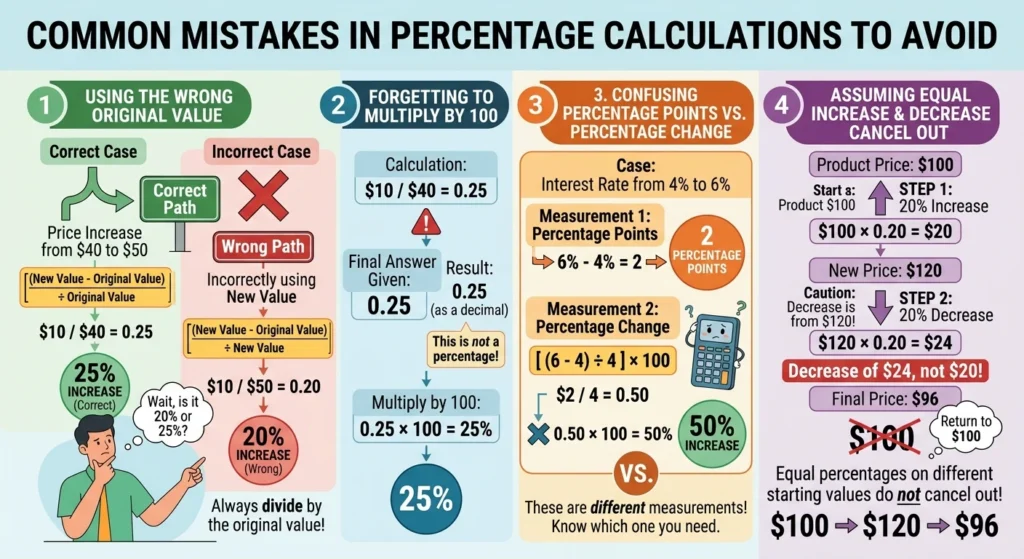
1. Using the Wrong Original Value
Always divide the difference by the original value, not the new value.
For example, if a price increases from $40 to $50, divide the $10 increase by $40.
2. Forgetting to Multiply by 100
After dividing the difference by the original value, multiply the result by 100 to express it as a percentage.
3. Confusing Percentage Points With Percentage Change
Suppose an interest rate rises from 4% to 6%.
The increase is 2 percentage points. However, the percentage increase relative to the original rate is 50%.
These are two different measurements.
4. Assuming Equal Increases and Decreases Cancel Out
Suppose a $100 product increases in price by 20%. Its new price is $120.
If the new price then decreases by 20%, the reduction is $24, not $20.
The final price becomes $96. Therefore, a 20% increase followed by a 20% decrease does not return the value to its original amount.
Frequently Asked Questions About Percentage Change
Find simple answers about percentage increase, percentage decrease, negative percentage changes, formulas, and calculating changes between original and new values.
What is the formula for percentage increase? +
The percentage increase formula is [(New Value − Original Value) ÷ Original Value] × 100. Use this formula when the new value is greater than the original value.
What is the formula for percentage decrease? +
The percentage decrease formula is [(Original Value − New Value) ÷ Original Value] × 100. Use it when the new value is smaller than the original value.
How do I calculate a 20% increase? +
Multiply the original value by 1.20 to calculate the new value after a 20% increase. For example, a $50 product becomes $60 because $50 × 1.20 = $60.
How do I calculate a 20% decrease? +
Multiply the original value by 0.80 to calculate the new value after a 20% decrease. For example, a $50 product becomes $40 because $50 × 0.80 = $40.
Can percentage change be negative? +
Yes. A negative percentage change means the new value is lower than the original value. For example, a change from 100 to 80 represents a 20% decrease, or −20% when expressed as a signed percentage change.
Can I calculate percentage change when the original value is zero? +
No. The standard percentage change formula cannot be used when the original value is zero because division by zero is undefined. You need another way to describe the change.
What is the difference between percentage increase and percentage decrease? +
Percentage increase measures how much a value has grown compared with its original value. Percentage decrease measures how much a value has fallen compared with its original value.
How do I calculate percentage change between two numbers? +
Subtract the original value from the new value, divide the difference by the original value, and multiply by 100. The result shows the percentage change between the two numbers.
Is percentage change the same as percentage difference? +
No. Percentage change compares a new value with an original value. Percentage difference usually compares two values using their average as the reference. The correct method depends on what you want to measure.
Can an online percentage change calculator calculate both increases and decreases? +
Yes. Enter the original value and the new value into a percentage change calculator. It can calculate the percentage change and help you identify whether the value increased or decreased.